Ask Secure Message a question. Answers come from this site's docs only. I will cite a page. I will not invent a product claim.
How it works
From MX record to a filtered inbox
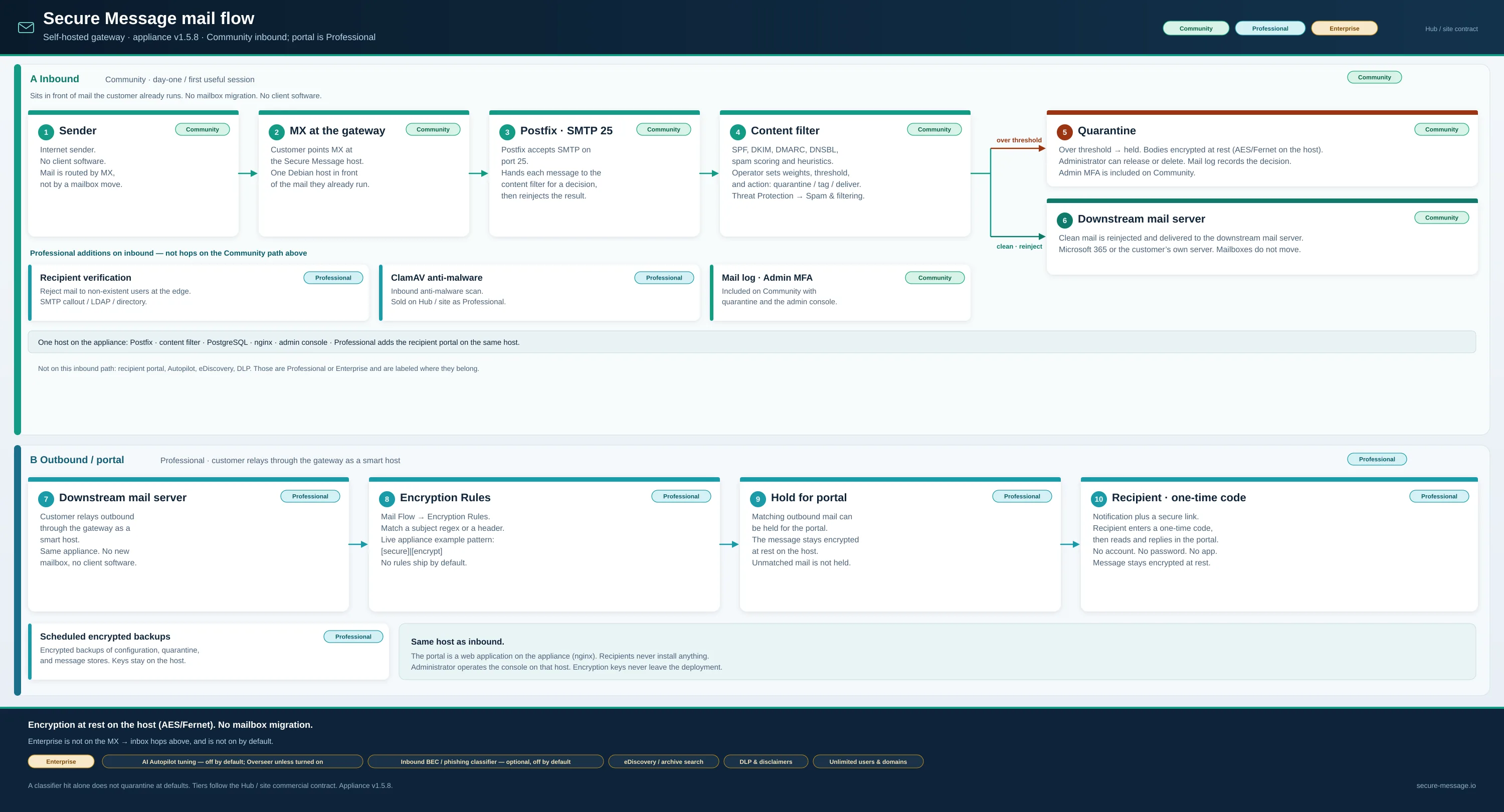
Community starts with inbound filtering on the box. The one-time-code portal is Professional. No mailbox migration, no client software.
How it works
From MX record to a filtered inbox
Community starts when inbound mail hits the gateway. The one-time-code portal is Professional. No mailbox migration and no client software.
1
Point your MX at the gateway
Route inbound mail through Secure Message and relay outbound through it as a smart host. Deploy the Debian appliance on a host you control — no mailbox migration, no client software.
2
Filter inbound, protect outbound
Inbound mail is authenticated and scored (SPF, DKIM, DNSBL and heuristics). Professional can hold matching outbound mail for the portal. Enterprise Autopilot and the inbound classifier stay off until you enable them.
3
Recipients read securely — no account
Professional. Protected messages arrive as a notification with a secure link. The recipient enters a one-time code and reads or replies in the portal, while everything stays encrypted at rest.