
Share sensitive information without making recipients jump through hoops.
When a message needs extra care, Secure Message holds it on your gateway and sends the recipient a link. They enter a one-time code from their inbox and read it in a secure portal. No account. No app.
Professional feature Not included in free Community.
Enter your one-time code
Sent to j••••@example.org
Open messageProtection people don't notice.
No sign-ups
Patients, clients and partners open the message with a code. Nothing to create, install or remember.
Content stays with you
The message and attachments wait, encrypted, on your gateway. The notification email carries no content.
No change for senders
Staff keep using their normal email client. A subject tag or a header triggers protection.
Four steps, start to finish.
You have received a secure message from Northbrook Family Practice.
Open it in your browser. You won't need an account or a password.
Open secure messageProtected by Secure Message. The content is not included in this email.
Secure message for
j••••@example.org
We'll email a one-time code to this address. Codes expire after 15 minutes.
Send my codeEnter your one-time code
We sent a 7-digit code to j••••@example.org.
Open message5 attempts · resend available after 60 seconds
Hi Jordan, here are the prep notes for Tuesday's visit. Please bring your insurance card and arrive ten minutes early.
visit-prep.pdfYou decide what gets protected.
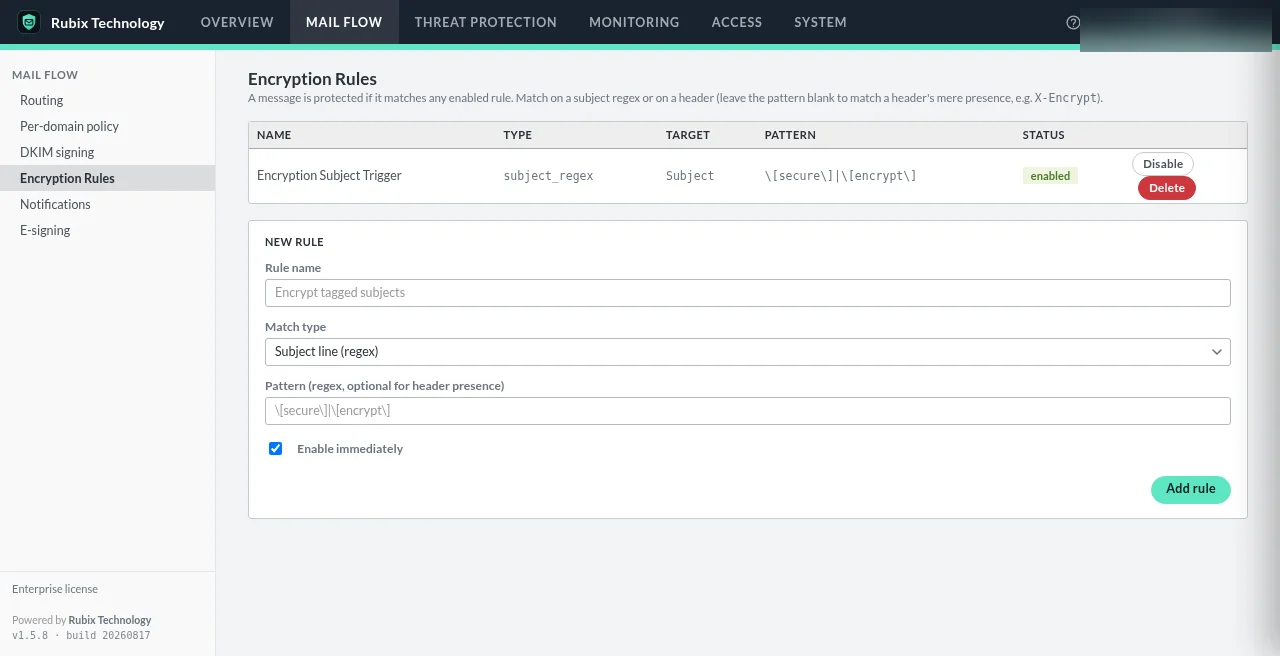
Protection rules match a subject regex or a named header. A user typing [secure] in the subject or an add-in stamping a header both work.
- No rules ship by default: the gateway never guesses what to encrypt
- Rules are evaluated per recipient
- Policies can hold mail for the portal, redirect it or block it before it leaves your domain
What happens when a rule matches
- Encrypt and hold
The entire raw message (headers, body and every attachment) is encrypted as one blob and written to the gateway's store.
- Notify
The recipient gets a plain notification email with a link to your portal. No content, no attachment.
- Verify
The portal shows their masked address and emails a 7-digit code to the stored address. Only the code's hash is kept; five wrong attempts burn it.
- Read & reply
The message is decrypted for viewing, sanitised and rendered in a sandboxed frame. Attachments decrypt one at a time on demand.
| Default | Value |
|---|---|
| One-time code | 7 digits · 15 minutes · 5 attempts · 60-second resend cooldown |
| Message readable for | 14 days from delivery |
| Unlocked session | 30 minutes, per message |
| Reply attachments | Up to 10 files, re-scanned |
Defaults from the architecture documentation; most are adjustable.
Portal questions
Is the secure portal included in the free Community edition?
No. The secure recipient portal is a Professional feature ($690/year, up to 10 domains, licensed for up to 100 users). Community covers inbound filtering.
Do recipients need an account or an app?
No. They open a link and enter a one-time code sent to the address the message was addressed to. No password, no plugin, no app.
What if someone forwards the link?
Forwarding doesn't transfer access. The one-time code is always emailed to the original recipient's address stored with the message, never to an address the visitor supplies.
How long can a recipient read the message?
By default, 14 days from delivery. After that the link returns an expired response, and the retention job deletes the encrypted message later (30 days by default).
Can recipients reply?
Yes. Replies come back through the portal. A reply to an internal address arrives as normal mail; a reply to another external address becomes a new secure message. Reply attachments are re-scanned.
Is this end-to-end encryption or S/MIME?
Neither. There's no S/MIME, PGP or per-message password. The message is encrypted at rest on your gateway and shown to the verified recipient over TLS in a sandboxed view.
Give recipients an easier way in.
See the portal in a short demo, or choose Professional and set up your first protection rule.
Professional: $690/year, up to 10 domains, licensed for up to 100 users.